Jump to:
ToggleOnline Bullet Journal Website: Best Digital Journaling Options
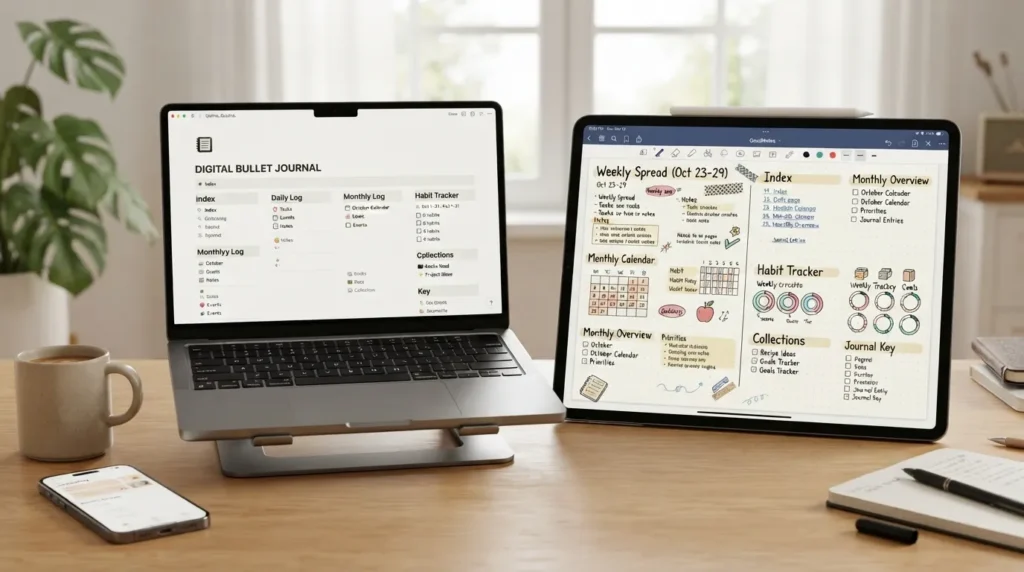
If you want an online bullet journal website, you have more choices than simply finding an app with a calendar and a to-do list. Some platforms are built specifically around the Bullet Journal method, while others—such as workspace, journaling, or design tools—can be adapted into a digital BuJo.
The best choice depends on what you want from your journal: a ready-made Bullet Journal system, maximum customization, attractive templates, a simple digital diary, or a printable PDF you can use on paper. I’ll walk you through those differences below so you can choose without having to test every platform yourself.
Short answer: If you want a digital version that closely follows the Bullet Journal concept, look first at a dedicated online Bullet Journal such as My Bullet Online. If you want to build your own system, Notion Bullet Journal templates offer more flexibility. For visual or printable layouts, Canva is a practical option. For a traditional Bullet Journal foundation, start with the method created by Ryder Carroll at Bullet Journal.
What Is an Online Bullet Journal?
An online bullet journal is a digital way to organize the same kinds of information you might normally keep in a paper Bullet Journal: tasks, appointments, notes, ideas, goals, habits, projects, and personal reflections.
The original Bullet Journal Method was created by Ryder Carroll. The method combines rapid logging, reflection, organization, and intentional planning rather than simply functioning as a decorative diary. Carroll explains that the system grew from years of testing different ways to manage information and focus, eventually becoming the Bullet Journal Method. Learn about the method’s origin. :contentReference[oaicite:0]{index=0}
When you move that system online, you can use a browser-based tool, an app, a digital planner, a customizable workspace, or even a template that you edit and print. The important difference is not whether the page looks like a notebook. It is whether the tool helps you capture information, organize it, review it, and act on what matters.
Best Online Bullet Journal Websites and Platforms
There is no single best platform for everyone. A dedicated BuJo tool and a flexible workspace solve different problems, so I would choose based on how much setup and customization you actually want.
1. My Bullet Online — Best for a Dedicated Digital Bullet Journal
My Bullet Online is designed specifically around the idea of taking the Bullet Journal approach online. Its current site describes a system for keeping tasks, appointments, notes, habits, and memories together across phone, tablet, and computer. :contentReference[oaicite:1]{index=1}
Best for: You want a purpose-built digital BuJo rather than building the system from scratch.
Useful features:
- Tasks and appointments in one place
- Notes, ideas, and memories
- Habit tracking
- Goals and project organization
- Calendar views
- Searchable information
- Collections for different areas of life
- Access across multiple devices
One of its practical advantages is that digital information can be moved, searched, and connected more easily than handwritten pages. Its site also explains how tasks, appointments, goals, habits, and journal entries can be brought into one system. :contentReference[oaicite:2]{index=2}
Possible limitation: A dedicated system may be less appealing if you enjoy designing every part of your own workspace or want a general-purpose tool that can be used for many unrelated workflows.
Choose it when: Your priority is having a digital Bullet Journal structure ready to use rather than spending time constructing one yourself.
2. Notion — Best for Customization and Templates
Notion is not a dedicated Bullet Journal application, but it can be adapted into one. Its template marketplace currently contains multiple Bullet Journal templates, including free options, and Notion also provides guidance for building a journal for beginners and more advanced users. :contentReference[oaicite:3]{index=3}
Best for: You want to create a highly customized digital system.
Useful features:
- Bullet Journal templates
- Custom pages and databases
- Task and project organization
- Different views for information
- Highly flexible layouts
- Templates that can reduce setup time
The trade-off is flexibility versus simplicity. A blank workspace gives you room to create almost exactly what you want, but you may spend more time deciding how your journal should work. Starting with an existing Bullet Journal template can make that easier.
Choose it when: You like customizing systems and want your Bullet Journal to connect with other notes, projects, databases, or workflows.
3. Journey — Best for a Journal-First Approach
Journey presents the bullet planner as a customizable way to organize everyday life. Its explanation emphasizes that a Bullet Journal is primarily a personal organization and planning method, with pages that can be designed around your own preferences. :contentReference[oaicite:4]{index=4}
Best for: You want more of a digital journaling experience while still using Bullet Journal ideas.
Possible limitation: If your main goal is a strict, ready-made Bullet Journal workflow with dedicated BuJo structures, a purpose-built tool may feel more direct.
Choose it when: Your journal needs to feel like a personal digital diary as much as a planner.
4. Canva — Best for Visual and Printable Bullet Journal Templates
Canva takes a different approach. Instead of being a dedicated Bullet Journal system, it provides customizable journal templates that can be edited online and printed. Canva also describes digital templates that can be updated from different devices. :contentReference[oaicite:5]{index=5}
Best for: You care about visual design, printable layouts, or starting from a ready-made page.
Useful for:
- Printable Bullet Journal pages
- Habit trackers
- Daily and weekly layouts
- Goal pages
- Visual journal designs
- Custom colors, fonts, and graphics
The important distinction is that Canva is primarily a design and template environment. It can help you create the pages, but it is not the same type of dedicated organizational system as a purpose-built online Bullet Journal.
Choose it when: Your priority is creating attractive, personalized, printable, or visually structured pages.
5. 101 Planners — Best for Printable Planner Resources
101 Planners is useful when your idea of an online Bullet Journal includes downloadable or printable planner pages rather than a fully digital app.
Best for: You want to find printable layouts and use them on paper or as part of your own planning system.
Possible limitation: A printable template does not automatically give you the search, synchronization, linking, or task-management functions of a digital platform.
Choose it when: You prefer the physical feel of paper but want to find and customize your layouts online first.
Which Online Bullet Journal Website Is Best for You?
Instead of choosing a platform because it appears first in a list, match the tool to the way you actually plan.
| If you want… | Start with… | Why |
|---|---|---|
| A dedicated digital BuJo | My Bullet Online | Built around online Bullet Journal organization. |
| Maximum customization | Notion | Flexible pages, databases, and templates. |
| A journal-first experience | Journey | Suited to a more personal digital journal approach. |
| Beautiful digital or printable pages | Canva | Large selection of editable journal designs. |
| Printable planning pages | 101 Planners | Useful when paper is still your preferred medium. |
Online Bullet Journal vs. Traditional Bullet Journal
Going digital does not mean you have to abandon the underlying Bullet Journal method. The main difference is the medium and the tools available to you.
| Feature | Traditional | Online |
|---|---|---|
| Writing | Handwritten | Typed or digitally written |
| Searching | Manual | Often much faster with digital search |
| Editing | Cross out, rewrite, migrate | Move or edit digital entries |
| Creativity | Very tactile and flexible | Depends on the platform and device |
| Access | Notebook in hand | Potentially across devices, depending on the service |
| Distractions | Usually fewer screen distractions | Depends on the device and workflow |
The original method is flexible enough to be adapted, but the digital version changes some of the practical mechanics. For example, digital tools can make information searchable and movable, while paper gives you a physical page that remains visible on your desk. These differences are worth considering before you switch. :contentReference[oaicite:6]{index=6}
What Pages Should an Online Bullet Journal Have?
You do not need to copy every Bullet Journal spread you see online. Start with the parts that solve your actual planning problems.
Index
An index helps you find the information stored in your journal. In a digital tool, search and links may reduce the need for a traditional handwritten index, but the organizing idea remains useful.
Future Log
Use a future log for dates and events that are important enough to remember but are not part of today’s work. The official Bullet Journal resources show several ways to structure future logs, including a simple view of upcoming months. :contentReference[oaicite:7]{index=7}
Monthly Log
A monthly log gives you a wider view of the month so appointments, deadlines, and important tasks do not disappear inside your daily list.
Daily Log
This is where you capture what is happening today: tasks, events, notes, ideas, and other information that needs your attention.
Collections
A collection is simply a group of information around one topic. Examples include books to read, travel plans, project notes, meal ideas, gift ideas, study plans, or work projects. The Bullet Journal ecosystem describes collections as a flexible way to group information that you want to remember, plan, or track. :contentReference[oaicite:8]{index=8}
Habit and Progress Trackers
Add trackers only when they help you notice a pattern or maintain a useful habit. A tracker should reduce mental load, not become another chore you feel obligated to complete.
How to Start an Online Bullet Journal as a Beginner
You do not need a complicated dashboard on your first day. A simple system is easier to maintain and gives you room to discover what you actually need.
- Choose your medium. Decide whether you want a dedicated online BuJo, a flexible workspace, a digital journal, or printable pages.
- Start with your current commitments. Write down the tasks, appointments, projects, and ideas that are already taking up space in your head.
- Create a simple future or monthly view. Add important dates and commitments so your daily list has context.
- Use rapid logging. Keep entries short and distinguish tasks, events, and notes rather than writing every item as a paragraph.
- Add collections only when you need them. If you start planning a trip, create a travel collection. If you begin a project, create a project collection.
- Review unfinished tasks. Decide whether a task should be moved, scheduled, delegated, or removed.
- Keep adjusting the system. The point is to create a system that supports your life rather than forcing your life to fit a template.
The official Bullet Journal Method puts particular emphasis on capturing information quickly and then reflecting on what deserves your attention. Rapid logging is described by Bullet Journal as the heart of the method. :contentReference[oaicite:9]{index=9}
How to Use Rapid Logging Online
Rapid logging is especially useful when your digital journal starts becoming too wordy. The idea is to record information quickly using short entries instead of turning every task into a full journal entry.
A simple digital interpretation might look like this:
• Task: Finish article outline
○ Event: 3:00 PM meeting
— Note: Ask about next month’s deadline
Your software may use different symbols or checkboxes, so do not worry about reproducing a paper notebook perfectly. The useful part is the principle: capture information quickly, identify what it is, and review it later.
Free Online Bullet Journal Options
If “free” is your first priority, look at the type of free resource you are actually getting. A free template is different from a free full-featured Bullet Journal system.
- Free template: You receive a layout that you customize.
- Free digital workspace: You build the Bullet Journal yourself inside a broader platform.
- Free printable: You download or print pages and use them physically.
- Free account with limits: A service may let you begin without payment while reserving some features for another plan.
For example, the current Notion marketplace contains free Bullet Journal templates, while Canva offers free Bullet Journal templates that can be customized and printed. :contentReference[oaicite:10]{index=10}
Before choosing a “free” option, check what you actually need: synchronization, search, templates, export, device access, recurring tasks, habit tracking, or simply a printable page. A free template can be perfect if you only need a layout, but it will not necessarily replace a dedicated planning application.
Online Bullet Journal Websites for Beginners
If you are completely new to Bullet Journaling, I would not start by downloading dozens of templates. First learn the basic idea, then choose the amount of structure you need.
A beginner-friendly path looks like this:
- Learn the basic Bullet Journal method from the official Bullet Journal resources.
- Choose a dedicated tool if you want less setup.
- Choose a template-based workspace if you enjoy customizing.
- Start with a future/monthly view and daily log.
- Add one or two collections that solve real problems.
- After a few weeks, remove pages and trackers you never use.
That last step matters. A Bullet Journal is supposed to adapt to you. If a habit tracker, elaborate mood page, or complex dashboard is making your system harder to maintain, it is reasonable to remove it.
Can You Make a Bullet Journal in Evernote?
Yes. Evernote can be adapted to a Bullet Journal-style workflow because the core idea is a method of organizing information, not a requirement to use one particular application.
A simple Evernote-based setup can use separate notes or notebooks for your future planning, monthly information, daily entries, and collections. The advantage of this approach is flexibility; the drawback is that you may have to design more of the system yourself than you would in a dedicated Bullet Journal tool.
If you search specifically for an Evernote Bullet Journal template, focus on whether the template actually supports the workflow you need. A visually attractive template is not necessarily a good planning system. Check whether it makes tasks, dates, notes, and recurring information easy to find and review.
Digital Bullet Journal Ideas You Can Actually Use
Once the basic system works, collections can make it much more useful. The best collection is usually not the prettiest one; it is the one that prevents you from repeatedly keeping the same information in your head.
- Work: project tasks, meeting notes, content ideas, deadlines, and follow-ups.
- Study: reading lists, assignment deadlines, revision plans, and notes.
- Travel: destinations, itinerary, packing list, reservations, and places to visit.
- Home: recurring chores, maintenance tasks, shopping lists, and household projects.
- Hobbies: books to read, films to watch, creative projects, or skills to practice.
- Goals: yearly goals, monthly priorities, project milestones, and next actions.
- Personal reflection: gratitude, memories, lessons learned, or questions you want to revisit.
Digital Bullet Journal collections can become much broader than a daily task list. For example, current online BuJo resources show collections being used for work projects, travel, hobbies, learning, self-care, finances, and personal development. :contentReference[oaicite:11]{index=11}
Common Problems With Online Bullet Journaling
You Spend More Time Designing Than Planning
This is one of the easiest traps to fall into. If you spend an hour choosing icons, colors, dashboards, and page layouts before writing down today’s priorities, the system has become the project.
Try this: use the simplest workable layout first. Add visual features only when they make information easier to use.
You Create Too Many Trackers
A tracker is useful when the information changes a decision. If you are recording ten habits but never reviewing the results, the tracker is producing work rather than insight.
Your Tasks Keep Moving Forward
Digital tools make moving tasks extremely easy, which can also make postponing them extremely easy. When the same task keeps appearing, stop and ask whether it is still important, whether it needs a smaller next action, or whether it should be removed.
The App Becomes a Distraction
A digital planner lives on a device that may also contain social media, messages, email, and entertainment. If screen distraction is a major problem for you, a paper Bullet Journal or a deliberately minimal digital setup may work better.
You Choose a Tool Before Defining the Problem
This is perhaps the most important mistake to avoid. Do not begin with “Which app is best?” Begin with “What do I need this system to help me remember, organize, or accomplish?” Then choose the platform that solves that problem with the least unnecessary effort.
How to Choose the Right Online Bullet Journal Website
Before you create an account, answer these questions:
- Do I want a ready-made system or do I enjoy building my own?
- Do I mainly need tasks and appointments, or do I also want journaling and reflection?
- Will I use it on a computer, phone, tablet, or several devices?
- Do I need search and links?
- Do I need habit trackers or other collections?
- Do I want to print my pages?
- How much setup am I realistically willing to do?
- Will this system make planning easier, or am I choosing it because the template looks impressive?
A useful rule: The best online Bullet Journal is not necessarily the platform with the most features. It is the one you can open regularly, understand quickly, and use to make better decisions about your time and attention.
Frequently Asked Questions
What is the best online bullet journal website?
There is no single best option for everyone. A dedicated tool such as My Bullet Online makes sense if you want a purpose-built digital BuJo. Notion is a better fit if customization is your priority, while Canva is useful for visual and printable templates. Your best choice depends on how much structure, customization, journaling, and planning functionality you need.
Is there a free online Bullet Journal?
Yes. Free options exist in several forms, including free templates and workspaces that can be adapted into a Bullet Journal. Notion’s marketplace currently includes free Bullet Journal templates, and Canva provides free Bullet Journal templates that can be customized and printed. :contentReference[oaicite:12]{index=12}
Can I use Notion as an online Bullet Journal?
Yes. Notion can be adapted into a digital Bullet Journal, and its marketplace contains multiple Bullet Journal templates. It is especially useful when you want to customize your pages or connect journaling with other types of information. :contentReference[oaicite:13]{index=13}
Can I make a Bullet Journal online without an app?
Yes. You can use a browser-based workspace, an online design tool, or a printable template. The method is more important than the software. What changes is how much of the system you need to build yourself.
Can I use a PDF as an online Bullet Journal?
You can use a PDF as a digital planner or print it and use it on paper, depending on the file and your device. A PDF is best thought of as a template or document format, not automatically as a complete Bullet Journal system. If you need search, task movement, synchronization, or dynamic tracking, a dedicated digital tool may be more suitable.
Is an online Bullet Journal better than a paper Bullet Journal?
Neither is universally better. Digital systems can make searching, editing, linking, and accessing information across devices easier. Paper gives you a physical, low-screen environment and more tactile freedom. Choose based on the way you naturally plan and the problems you want the journal to solve.
What should a beginner put in a digital Bullet Journal?
Start with a future or monthly view, a daily task and note area, and a small number of collections. Add habit tracking or other specialized pages only when you have a real reason to use them.
Final Thoughts
An online bullet journal website can be as simple as a digital daily log or as detailed as a complete system for tasks, appointments, goals, habits, projects, notes, and reflection. You do not need to recreate every elaborate spread you see online.
If you want the closest experience to a purpose-built digital Bullet Journal, start with a dedicated platform. If you want control over how everything works, consider a flexible workspace such as Notion. If your priority is visual design or printable pages, Canva and printable-planner resources make more sense.
Most importantly, start small. A useful Bullet Journal should help you capture what matters, see what needs attention, and decide what deserves your time. Once the basic system works, you can add the collections, trackers, templates, and creative touches that genuinely make your planning easier.
For the original Bullet Journal Method and its creator, Ryder Carroll, see the official Bullet Journal website. :contentReference[oaicite:14]{index=14}
Pimchanok Srisuk
Pimchanok Srisuk is the Journaling Editor at Holistic Wellbeing Living. She writes about journaling prompts, reflective writing, emotional clarity, and mindful routines. With seven years of experience creating personal-growth content, Pimchanok helps readers use simple writing practices to understand their thoughts and make calmer everyday decisions.