Jump to:
ToggleDigital Journaling: The Complete Guide to Starting, Securing, and Sustaining a Digital Journal
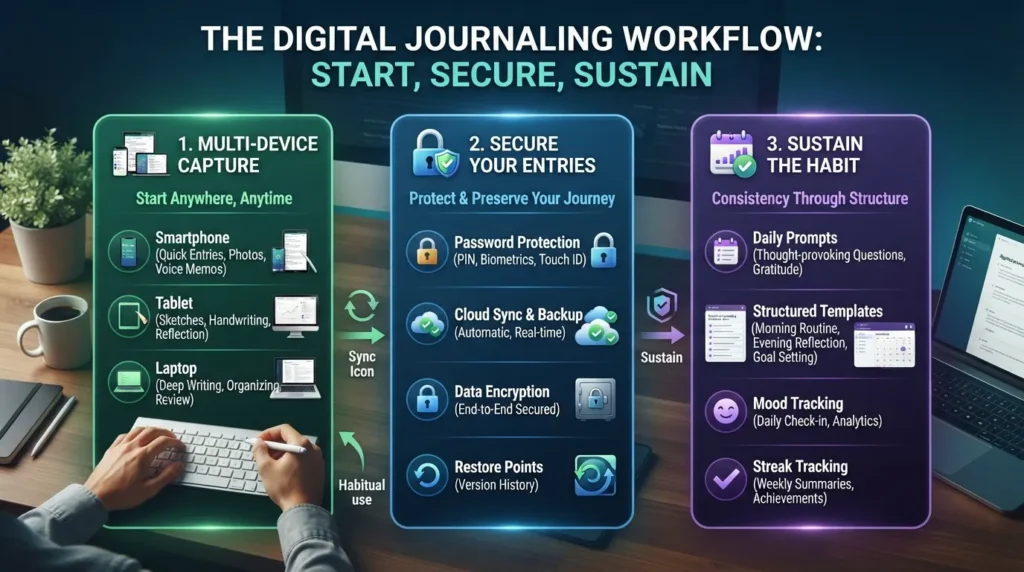
We have all felt the distinct pressure of a brand-new notebook: hovering a pen over that intimidating first white page, worried that our handwriting won’t look right or that our thoughts aren’t profound enough to merit the paper. In contrast, staring at a blank digital screen offers a frictionless, forgiving entry point where words can flow freely, typos vanish with a backspace, and creativity knows no bounds. As mindfulness and intentional screen time surge in popularity, digital journaling has rapidly evolved from a niche tech habit into an essential daily ritual for modern well-being.
Digital journaling is the practice of recording personal thoughts, reflections, goals, and daily events using electronic devices such as smartphones, tablets, or computers instead of traditional pen and paper. Whether you are looking to clear your mind, boost your productivity, or preserve memories on the go, this comprehensive guide covers everything you need to build a lasting habit. Below is a quick roadmap of what we will explore:
The Core Benefits: Discover how digital writing transforms mental health and personal growth.
Methods & Customization: Learn how to design your practice, from a custom diary to structured templates.
Top Apps & AI Tools: Explore the best platforms and learn how to create digital journals template with ai.
Privacy & Protection: Understand how to safeguard your deepest thoughts using an encrypted diary.
Academic & Specialized Use: Find out how students stay organized with a page a day academic diary format adapted for digital spaces.
What Is Digital Journaling?
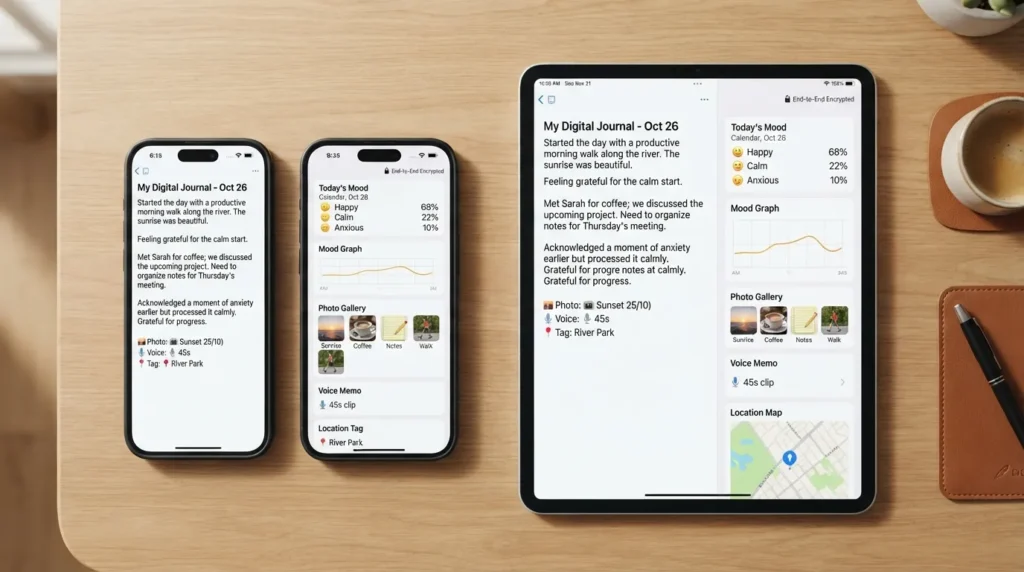
Digital journaling is the practice of recording thoughts, reflections, and daily experiences using a digital device—app, software, or document—instead of pen and paper. It offers a flexible, modern approach to self-reflection, allowing users to seamlessly capture memories, track habits, and organize their minds anywhere, anytime.
Digital Journaling vs. Traditional Paper Journaling
When exploring digital vs. paper journaling comparison methods in the ongoing paper vs. digital debate, it helps to look at how they stack up across key features:
| Feature | Digital Journaling | Traditional Paper Journaling |
|---|---|---|
| Accessibility | Available instantly across synced devices (phones, tablets, laptops). | Requires carrying a physical notebook everywhere you go. |
| Searchability | Instant keyword search, tags, and date filters to find past entries. | Manual skimming required; relies heavily on your own index or memory. |
| Security | High-level encryption, passwords, and biometric locks to keep prying eyes away. | Vulnerable to anyone who physically opens or finds your notebook. |
| Sensory Experience | Sleek, frictionless typing with multimedia support (photos, audio notes, web clippings). | Tactile pleasure of pen on paper, physical weight, and handwriting connection. |
| Cost | Ranges from free apps to paid subscriptions or advanced software tools. | Requires ongoing purchases of notebooks and favorite pens. |
| Backup/Loss Risk | Cloud-backed safety ensures memories are never lost to a broken device. | Risk of complete loss due to water damage, fire, or misplacement. |
Why Digital Journaling Is Growing in Popularity
The modern shift toward digital wellness has fueled a massive spike in screen-based reflection. Several key factors drive this growth:
Smartphone Ubiquity: Because our phones are always within arm’s reach, capturing a sudden flash of inspiration or processing a stressful moment takes seconds, drastically lowering the barrier to entry.
Mental Health Awareness: As daily stress and anxiety management become top priorities, people are actively seeking frictionless mental health tools that fit into fast-paced routines.
Remote and Hybrid Lifestyles: With work and personal lives centralized on digital screens, keeping a virtual journal eliminates extra clutter while fitting neatly into a digital-first workspace.
AI-Assisted Reflection Tools: Modern platforms now feature smart prompts, sentiment analysis, and the ability to create digital journals template with ai, transforming journaling from a blank page into an interactive, guided dialogue.
The Psychological Benefits of Digital Journaling

Beyond being a simple productivity hack or a daily habit tracker, digital journaling serves as a profound therapeutic tool for mental well-being. When integrated thoughtfully into your routine, a digital screen transforms into a private sanctuary for processing emotions, untangling complex thoughts, and cultivating long-term psychological resilience.
What Do Psychologists Say About Journaling?
Decades of psychological science—beginning with landmark studies on the expressive writing paradigm—demonstrate that writing about stressful or emotional events yields tangible improvements in both mental and physical health. According to peer-reviewed research on expressive writing, taking just a few minutes out of your day to unpack deep thoughts helps reduce cognitive overload. Psychologists explain that putting feelings into words lowers physiological arousal, aids emotional regulation, and helps the brain process distressing memories rather than keeping them bottled up.
Key Benefits Backed by Research
When you maintain a consistent digital journaling practice, you unlock a wide array of scientifically supported mental health advantages:
Reduced anxiety and rumination: Getting thoughts out of your head and onto a screen prevents circular thinking loops and quietens a racing mind.
Improved emotional clarity: Typing out your experiences helps you identify specific triggers, name your emotions accurately, and gain objective distance from them.
Better sleep quality (evening journaling): Doing a nightly “brain dump” clears lingering work tasks or worries from your active memory, making it easier to fall and stay asleep.
Enhanced memory and self-awareness: Searching through past entries reveals behavioral patterns, growth milestones, and recurring life themes over time.
Goal tracking and accountability: Documenting targets alongside daily reflections keeps your aspirations front and center, boosting follow-through.
The Dark Side of Journaling
While journaling is overwhelmingly positive, it is entirely possible to misuse the practice. Without mindful boundaries, a journal can accidentally morph into an echo chamber for rumination. Instead of actively processing emotions, overusing a journal can trap you in repetitive overthinking loops where you constantly rehash negative events without seeking resolution. Furthermore, if journaling is used purely as a form of avoidance—such as hiding behind a screen to dodge difficult real-world conversations or tasks—it ceases to be a therapeutic outlet and becomes a procrastination tool.
Signs your journaling routine is becoming unhealthy:
You consistently feel worse, more drained, or deeply agitated after writing, with no sense of release or closure.
Your entries are entirely fixated on complaints without ever exploring solutions, lessons, or balanced perspectives.
You use writing as an excuse to isolate yourself from friends, family, or necessary social interaction.
Your journal feels like a heavy emotional burden rather than a helpful tool.
What Not to Do When Journaling
To keep your digital journaling practice sustainable, uplifting, and genuinely beneficial, avoid these common pitfalls:
Forcing toxic positivity: Do not feel pressured to turn every single negative entry into a forced “silver lining.” True processing requires acknowledging authentic feelings of frustration, sadness, or anger.
Journaling only when upset: If you only open your digital journal during emotional crises, your brain will start to associate the habit purely with stress. Balance your entries by recording gratitude, creative ideas, and daily joys.
Having zero structure: Staring at a completely blank screen every single day can cause severe writer’s block. Incorporating occasional prompts or templates keeps the friction low.
Comparing your entries to others: Social media is full of aesthetic, perfectly formatted journal pages. Remember that your digital journal is a private tool for you, not a performance piece for an audience.
Treating it as a rigid chore: If you treat journaling like a mandatory homework assignment, you will quickly burn out. Give yourself permission to skip days or write just a single sentence when life gets busy.
Popular Digital Journaling Methods & Frameworks
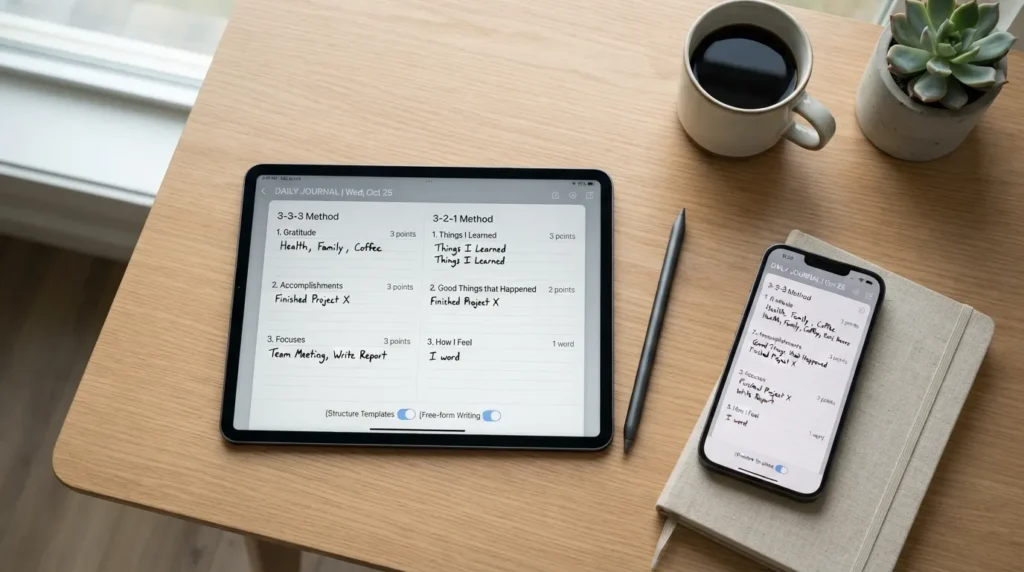
Staring at a blank screen can sometimes feel just as intimidating as an empty sheet of paper, especially when you are tired or stressed and do not know where to begin. If you have ever opened a digital document or app only to wonder what on earth you should write about, you are not alone. Incorporating structured frameworks can completely transform your writing routine. By providing gentle guardrails, these methods remove the guesswork, lower the barrier to entry, and help you get straight to the heart of what matters.
The 3-3-3 Journaling Method
The 3-3-3 method is a brilliant, quick-fire framework designed to center your mind in just a few minutes. Perfect for busy digital journalers who want maximum clarity with minimal friction, this approach breaks your entry down into three distinct categories of three items each:
3 things you are grateful for: Shifting your focus to appreciation right at the start of your entry.
3 things you accomplished today: Celebrating small victories, work wins, or personal tasks completed, no matter how minor.
3 things you are focused on tomorrow: Pre-loading your priorities for the next day so you can wake up with a clear sense of direction.
The 3-2-1 Journaling Method
If you are looking for a framework that blends active learning with deep self-reflection and execution, the 3-2-1 method is an ideal evening or weekend routine. It guides your thoughts through a progressive lens:
3 things learned: New insights, facts, or lessons you picked up throughout your day.
2 things to reflect on: Emotional takeaways, recurring patterns, or moments that caught your attention and warrant a deeper look.
1 action step: A single, concrete commitment you can take tomorrow based on today’s reflections.
Reverse Journaling — What It Is and How It Works
Reverse journaling flips the traditional diary format on its head. Instead of simply logging the events of today from the present moment, reverse journaling involves writing from a future perspective—such as drafting an entry as if your goals for next year have already been achieved—or responding directly to your own past entries. By reading what you wrote six months ago and typing out a reply, you create an active, ongoing dialogue with yourself over time, which offers a powerful bird’s-eye view of your personal evolution.
Free-Form vs. Structured Journaling — Finding Your Balance
The secret to a sustainable digital journaling habit isn’t sticking religiously to just one format; it is learning how to fluidly alternate between structured frameworks and open-ended expression depending on your current energy levels and emotional goals. On days when you feel overwhelmed or distracted, structured prompts act as an anchor. On days when your mind is racing and you need to purge a jumbled mix of thoughts, tossing the structure aside for free-form writing is often the best medicine.
When to use structure:
You are tired, short on time, and need a quick mental reset before bed.
You are experiencing severe writer’s block and need a prompt to get your fingers moving.
You are tracking specific habits, goals, or daily metrics.
When to go free-form:
You are processing a major life event, intense emotion, or unexpected conflict.
You want to brainstorm creative ideas, business concepts, or passion projects without rigid boundaries.
You simply feel like rambling and letting your thoughts wander wherever they want to go.
How to Start Digital Journaling (Step-by-Step for Beginners)
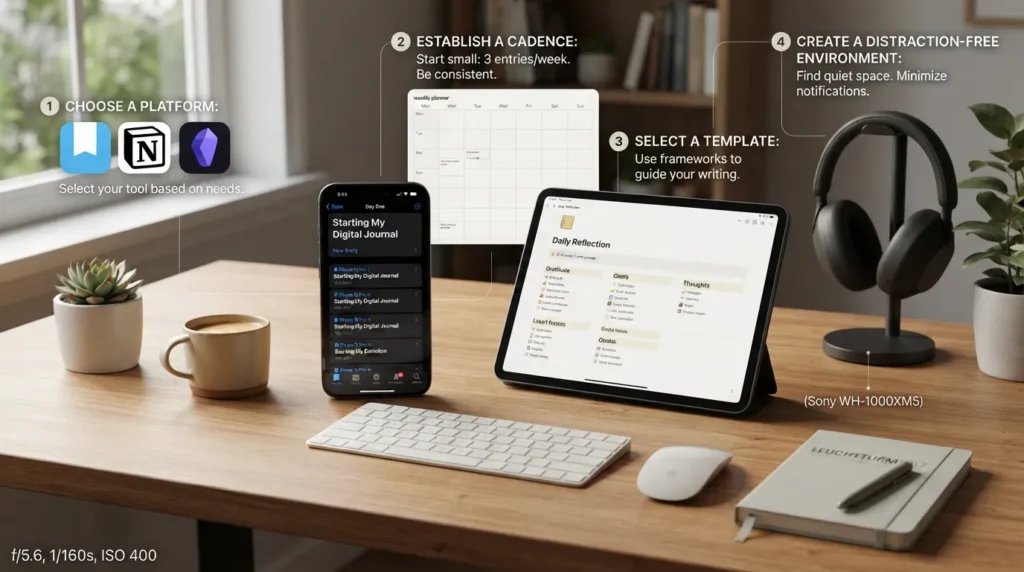
Starting a digital journaling practice does not require an expensive setup or a complicated workflow. By breaking the process down into manageable steps, you can build a sustainable, friction-free habit that seamlessly integrates into your daily life.
Step 1 — Choose Your Platform
Your first decision is selecting where your digital words will live. You have three main categories to choose from, depending on your style:
Dedicated Journaling Apps: Platforms designed specifically for reflection (such as Day One, Journey, or Reflect) often include mood tracking, automatic weather/location tagging, and built-in encryption.
Note-Taking Tools: Versatile workspace apps like Notion, Obsidian, or Apple Notes offer incredible flexibility, letting you link entries to other notes, databases, or project boards.
Simple Documents: Standard word processors (Google Docs, Microsoft Word) provide a clean, distraction-free blank slate if you prefer minimalist typing without extra features.
Step 2 — Set a Realistic Cadence
Trying to write a massive entry every single day is the fastest way to burn out. Instead, align your writing frequency with actual habit science, choosing a cadence that fits your lifestyle:
Daily (Micro-Entries): Writing just 3 to 5 sentences every night. This works best for people who thrive on small, consistent daily touchpoints.
3x per Week: Scheduling sessions on specific days (like Monday, Wednesday, and Friday). This provides enough breathing room while keeping your thoughts fresh.
Weekly Review: Setting aside 20 to 30 minutes every Sunday to reflect on the past week’s wins, challenges, and lessons. Perfect for busy schedules.
Step 3 — Pick a Method or Template
Having a framework ready removes the intimidation of a blank screen. If you’d rather skip the blank-page problem entirely, our guide on how to create digital journals template with ai (paired with a journal generator) shows you how to build a personalized prompt system in minutes. You can also rely on established structures like the 3-3-3 or 3-2-1 methods discussed earlier to guide your writing.
Step 4 — Build the Habit (Overcoming Screen Fatigue)
Because digital journaling involves a screen, it is easy to run into digital burnout—especially if you already spend all day staring at a monitor for work or school. To protect your eyes and maintain enthusiasm, it helps to anchor your writing to existing physical routines, reduce blue-light strain by using dark mode or e-ink tablets, and carve out intentional device-free windows for your mental well-being.
Practical screen-fatigue fixes:
Enable Dark Mode or Amber Tones: Switch your app to dark mode or a warm color palette in the evening to cut down on harsh screen glare before bedtime.
Pair with an Offline Trigger: Connect your digital journaling time to a tangible analog habit—such as writing immediately after brewing your morning coffee or right after turning off your bedside lamp.
Use Distraction-Free Modes: Turn off phone notifications, close extra browser tabs, and use full-screen typing modes so your journal feels like a quiet sanctuary rather than another workspace.
Explore E-Ink Devices: If looking at backlit screens tires your eyes, consider using an e-ink tablet (like a reMarkable or Kindle Scribe) that gives you the digital syncing benefits of text without the bright LED screen glare.
Best Digital Journaling Apps & Tools in 2026
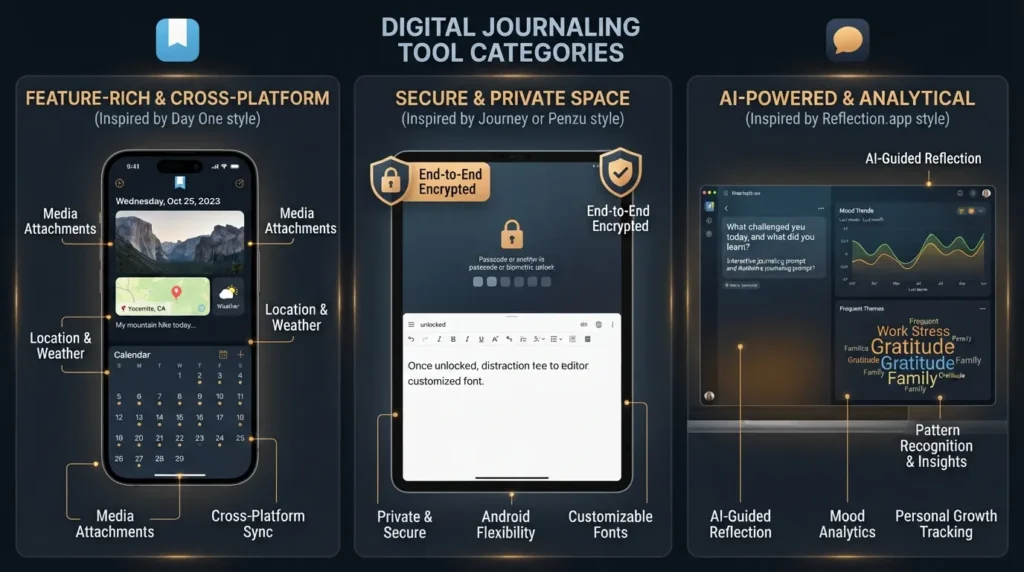
Navigating the vast ecosystem of digital journaling software can feel overwhelming. Whether you are looking for an app with automated prompts, a minimalist document space, or an immersive stylus-friendly template, finding the right tool depends entirely on your personal workflow. To help you cut through the noise, this curated, non-biased roundup explores the top platforms, tools, and community favorites available to jumpstart your writing practice.
| App / Tool | Best For | Price | Platform |
|---|---|---|---|
| Day One | Best overall / cross-platform experience | Free tier; Premium subscription options | iOS, macOS, Android, Windows, Web |
| Penzu | Best for privacy-focused beginners and web users | Free basic version; Pro plans from ~$19.99/year | Web, iOS, Android |
| Paperlike's interactive digital journal | Best for tablet and stylus users wanting a tactile paper feel | One-time purchase | iPad, Android Tablets (via PDF annotation apps) |
Best Free Journal Apps for Android
If you use an Android device and want to start journaling without spending a dime, these top-rated apps offer robust features, cloud backup, and clean interfaces:
Journey: One of the most popular cross-platform journal apps for Android, featuring rich text editing, photo attachments, a built-in mood tracker, and Google Drive backup integration.
Diaro: A clean, multi-language diary and mood tracker designed for easy organization with folders, tags, and powerful keyword search filters.
Google Keep / Docs: Excellent minimalist options if you prefer simple cloud-synced text files without the distractions of a dedicated journaling interface.
Standard Notes: A hyper-secure, open-source note-taking app offering end-to-end encryption for users who treat absolute privacy as their top priority.
What Real Journalers Say (Reddit Community Insights)
When exploring online communities like the r/Journaling community discussion on digital journaling, the conversation often highlights a fascinating psychological divide. While many traditional purists argue that physical pen and paper are irreplaceable for mindfulness, digital converts emphasize the unmatched power of speed, searchability, and security. Reddit users frequently praise apps like Journey and OneNote for allowing them to quickly untangle erratic thoughts without worrying about messy handwriting or lost notebooks, proving that the best journal is ultimately the one you will actually use consistently.
Digital Journaling Templates & PDFs
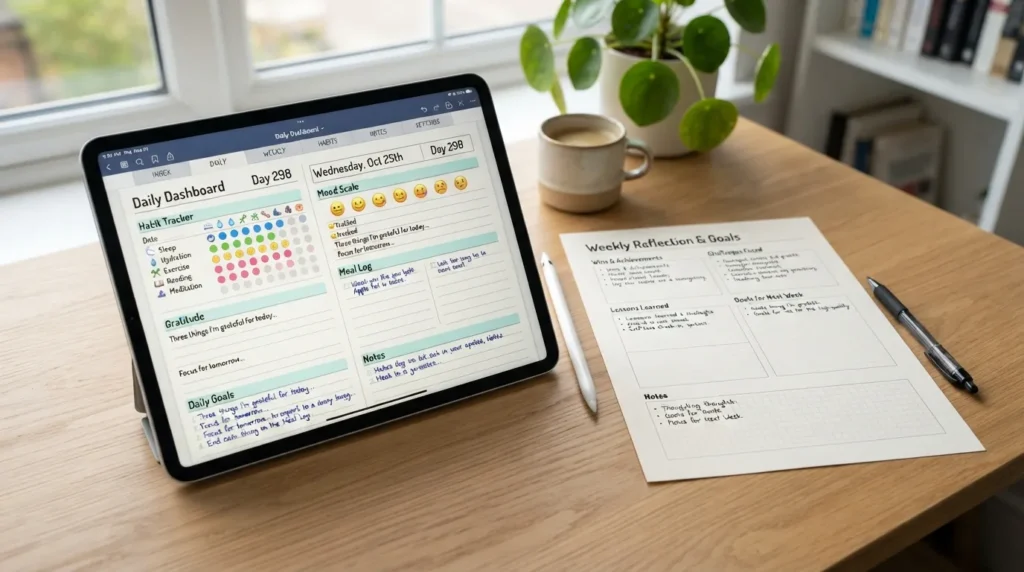
When searching for the right tools to kickstart your writing habit, you will likely encounter a flood of queries for a digital journaling template, downloadable digital journaling pdf formats, or resources labeled digital journaling free. While pre-made PDFs and printable templates can be wonderful visual kickstarters, the real power of digital journaling lies in its flexibility. By utilizing structured layouts, you can stop staring at a blank screen and instantly channel your thoughts into meaningful self-reflection.
Types of Templates You Can Use
Different layouts serve different psychological and organizational needs. Incorporating these popular template styles into your digital workspace keeps your routine fresh and purposeful:
Gratitude Log: A quick, daily list format dedicated to capturing small joys, positive moments, and things you appreciate.
Habit Tracker: A grid or check-box matrix designed to monitor daily routines, hydration, sleep, or mindfulness habits alongside your notes.
Mood Tracker: A color-coded scale or visual chart to map emotional fluctuations, helping you spot underlying patterns or triggers over time.
Goal-Review Spread: A monthly or quarterly breakdown that measures progress against your broader ambitions and allows for mid-course adjustments.
Weekly Reflection: A structured review template asking what went well, what challenged you, and what lessons you are taking into the days ahead.
Build Your Own Template with AI
Rather than downloading a generic PDF, you can create digital journals template with ai — a faster way to generate prompts tailored to your goals using a journal generator. Artificial intelligence tools allow you to input your specific personal growth targets, stress levels, or focus areas, instantly building custom writing prompts and modular layouts that evolve as your needs change.
Structured Long-Term Formats
For those who prefer a fixed daily structure over freeform digital entries, a page a day academic diary (also known as a 1 year journal or 1 year diary) offers a guided, date-specific format that pairs well with digital backups. This style provides a dedicated, bite-sized slot for every single day of the year, preventing overwhelm and ensuring you always have a clear, designated space to write.
Personalizing Your Journal
If a generic template or app doesn’t fit your style, a custom diary (or customised diary) lets you design the exact layout, prompts, and cover to match your journaling goals. Whether you prefer minimalist text files, colorful multimedia dashboards, or structured digital binders, tailoring your virtual environment ensures your journal feels uniquely yours.
Digital Journaling Ideas & Prompts

When you sit down to write, having a reservoir of thoughtful questions at your fingertips can completely eliminate writer’s block. Whether you have two minutes during your morning commute or twenty minutes to unwind before bed, having targeted prompts transforms digital journaling from a chore into a creative outlet. This curated collection of daily and themed prompts gives you instant inspiration to spark your next entry.
Daily Prompt Ideas
Keep these quick, high-impact prompts bookmarked in your digital notes app for whenever you need a fast mental reset:
The Highlight Reel: What is one small moment from today that made you smile, and why did it stand out?
Emotional Check-In: If your current mood had a weather forecast right now (e.g., sunny, stormy, foggy), what would it be?
Gratitude Shift: Name three completely ordinary, overlooked things you appreciate about your day today.
Release & Reset: What is one frustrating thought or worry that you are ready to let go of before tomorrow?
Micro-Goal: What is the single most important task you want to accomplish tomorrow, and how will you set yourself up for success?
Energy Audit: What activity or interaction drained your energy today, and what gave you a boost?
Self-Compassion: If a close friend were feeling the way you feel right now, what advice would you give them?
Creative Spark: If you could instantly learn any new skill or hobby overnight with zero effort, what would you choose and why?
Themed Journaling Ideas
If you want to branch out beyond daily reflections, organizing your entries around specific themes helps you track personal growth in distinct areas of your life:
Travel Journal: Document your adventures on the go by logging local foods, unexpected detters, sensory details, and geotagged photos from your phone during a trip.
Work/Career Journal: Keep a dedicated space for professional wins, project milestones, feedback received, and notes on tricky workplace dynamics to prep for performance reviews.
Health & Fitness Log: Track how physical movement, sleep quality, and nutrition impact your overall mood and energy levels throughout the week.
Dream Journal: Open your notes app immediately upon waking up to jot down fleeting dream fragments, recurring symbols, or subconscious themes before they fade.
Relationship Reflection: Process your connections with friends, family, or partners by exploring how you communicated, conflicts that arose, and moments of deep appreciation.
Keeping Your Digital Journal Secure & Private

One of the most common hesitations people have when considering a switch from traditional paper to a screen is the fear of privacy loss. With physical notebooks, you can tuck them under a mattress or lock them in a drawer. Digital journals, however, live in the cloud, on shared family tablets, or inside apps synced across multiple devices. Fortunately, modern digital security measures offer levels of protection that a simple cardboard lock and key could never match, giving you total peace of mind to write with absolute honesty.
Why Journal Security Matters
Your journal is a sacred space designed for your rawest thoughts, unfiltered emotions, secret ambitions, and personal vulnerabilities. Because this content is deeply sensitive, security matters immensely. If a device is stolen, lost, or accessed by family members, roommates, or coworkers sharing a computer, unsecured files are completely exposed. Furthermore, relying on standard cloud storage without proper configuration can leave personal reflections vulnerable to data breaches or unwanted sync sharing, making proactive privacy measures an absolute necessity.
Encryption & Password Protection Explained
For maximum privacy, consider switching to an encrypted diary — a password protected journal that keeps your entries locked even if your device is lost or shared. Encryption scrambles your readable text into complex code using advanced mathematical algorithms (such as AES-256 or zero-knowledge architecture). This means that even if a hacker or a cloud provider intercepts your files, they cannot read a single word without your unique master decryption key or biometric authorization.
Best Practices for a Secure Digital Journaling Workflow
Implementing a few smart security habits ensures your private thoughts remain strictly yours:
Enable App-Level Biometric Locks: Turn on Face ID, fingerprint scanning, or a secure passcode specifically for your journaling app so that unlocking your phone doesn’t automatically unlock your diary.
Use Unique, Strong Passwords: If your journaling platform requires an account login, use a password manager to generate a complex, unguessable password that you don’t reuse anywhere else.
Understand Your Cloud Sync Settings: Review where your backups are stored. If using third-party clouds like Google Drive or iCloud, ensure end-to-end encryption (E2EE) is activated for those folders.
Export and Back Up Periodically: Maintain an offline, encrypted backup of your journal files on an external hard drive or secure flash drive so you never lose your memories due to account lockouts.
Read App Privacy Policies: Before committing to a new journaling app, check whether they sell user data, train AI models on private text, or utilize zero-knowledge privacy where only you hold the keys to your data.
Frequently Asked Questions
Final Thoughts — Building a Digital Journaling Practice That Lasts
Embarking on a digital journaling journey is less about finding the absolute “perfect” app and more about creating a frictionless, personal sanctuary where your thoughts can breathe. By combining the right framework—whether it is a quick 3-3-3 method or a structured page a day academic diary layout—with a reliable digital platform, you set the stage for genuine self-reflection. Remember that consistency trumps perfection every single time; writing just one honest line on your phone before bed is infinitely more powerful than staring at a blank screen waiting for inspiration to strike.
As you take your next steps toward a mindful daily routine, you don’t have to start from scratch. Whether you want to create digital journals template with ai to match your exact goals, design a custom diary tailored to your creative workflow, or lock down your personal thoughts inside a fully encrypted diary, the tools are completely in your hands. Open your screen, let go of the pressure, and start writing your story today—one sentence at a time.
Pimchanok Srisuk
Pimchanok Srisuk is the Journaling Editor at Holistic Wellbeing Living. She writes about journaling prompts, reflective writing, emotional clarity, and mindful routines. With seven years of experience creating personal-growth content, Pimchanok helps readers use simple writing practices to understand their thoughts and make calmer everyday decisions.